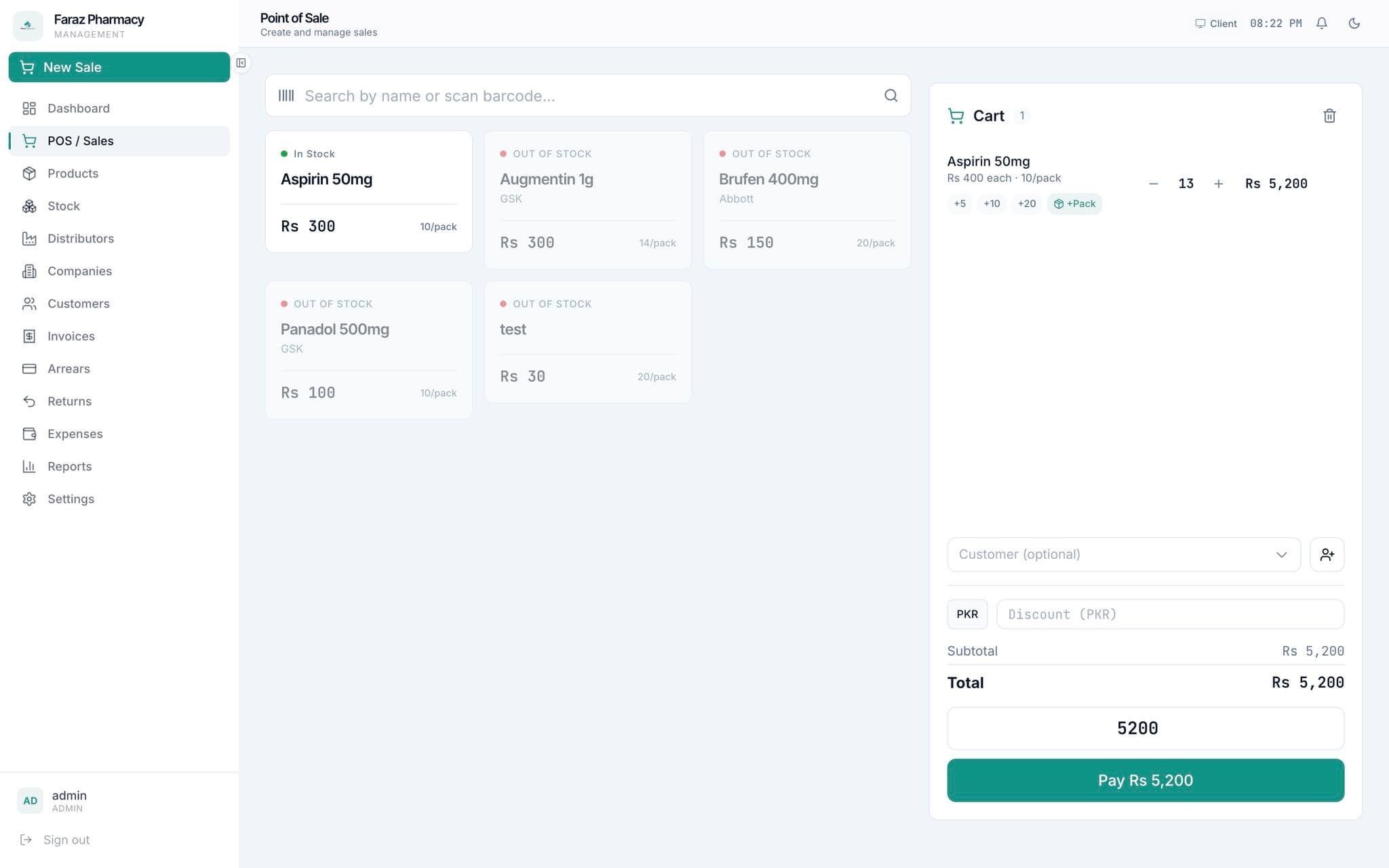
Building an Offline-First Pharmacy Management System
This pharmacy management system is an offline-first desktop application designed for independent pharmacies that cannot rely on stable internet connectivity. It manages inventory, billing, customer relationships, and reporting - all running locally with optional LAN synchronization across multiple computers.
The application uses Electron for cross-platform desktop deployment, React for the UI layer, Prisma ORM with SQLite for local data persistence, and a custom synchronization engine that merges data across machines when connected to the local network.
Small and medium pharmacies in Pakistan operate in environments where internet is unreliable, cloud dependency is a liability, and staff are not tech-savvy. The system was designed from the ground up to work without internet, sync automatically when a LAN is available, and provide a user experience that matches the speed of paper-based workflows.
Independent pharmacies in developing markets face a unique set of challenges. They operate on thin margins, serve hundreds of customers daily, and manage thousands of stock-keeping units (SKUs) - all while dealing with unreliable internet and frequent power outages.
Existing pharmacy management software falls into two categories: expensive enterprise systems (like SAP or specialized pharmacy ERPs) that are priced out of reach, and cloud-based solutions that become unusable when the internet goes down - which happens multiple times a week in many areas.
A typical pharmacy has 2-4 computers: one at the billing counter, one for inventory management, and one in the back office. Staff need to move between these stations throughout the day. Without a shared local database, each computer becomes an island of data, forcing duplicate data entry and reconciliation headaches at the end of each day.
The core problem was simple: how do you give a small pharmacy the same data integrity and operational efficiency as a large chain - without requiring internet connectivity, dedicated IT staff, or expensive hardware?
Business Goals
- Provide a complete pharmacy management solution at an affordable one-time license fee (no recurring SaaS costs)
- Eliminate revenue leakage from misplaced inventory, expired stock, and manual billing errors
- Reduce daily reconciliation time from 1 hour to under 5 minutes
- Enable pharmacies to make data-driven restocking decisions based on sales trends
Technical Goals
- Build an offline-first application that functions fully without internet connectivity
- Implement LAN-based synchronization with conflict resolution for multi-computer setups
- Achieve sub-100ms response times for billing and inventory search operations
- Support up to 10,000 SKUs without degradation in search or billing performance
- Ensure data integrity through ACID-compliant transactions on the local database
User Goals
- Pharmacists need to look up medicines by name, category, or barcode in under 2 seconds
- Cashiers need to complete a billing transaction in under 30 seconds, including printing a receipt
- Inventory managers need real-time stock levels with automated low-stock and expiry alerts
- Owners need daily, weekly, and monthly sales reports without manual data compilation
Functional
Non‑Functional
Performance
- • Medicine search returns results in under 500ms for 10,000 SKUs
- • Billing transaction (item scan → payment → receipt) completes in under 30 seconds
- • Daily sales report generates in under 2 seconds for 500+ transactions
- • Application cold start time under 3 seconds on standard hardware
Security
- • Local database encryption using SQLCipher or similar technology
- • User authentication with bcrypt password hashing
- • Session timeout after 30 minutes of inactivity
- • Audit logging for all inventory adjustments and financial transactions
- • Automatic database backup on application close
Scalability
- • Support for up to 5 concurrent users on the local network
- • Sync engine handles up to 10,000 new records per day across all connected machines
- • Database size of up to 500MB without performance degradation
Maintainability
- • Auto-update mechanism for seamless application updates
- • Centralized error logging with opt-in crash reporting
- • Database migration system for schema updates across versions
System Flow
- 1On application startup, Electron launches the React UI and initializes the local SQLite database through Prisma. If this is the first run, the database schema is created and seeded with default configuration.
- 2All operations - billing, inventory management, customer lookup - read from and write to the local SQLite database directly. There is no network dependency for core functionality. Every transaction is ACID-compliant through SQLite's transaction support.
- 3When a transaction is completed locally, it is recorded in a sync queue table with a timestamp, machine ID, and sync status. The sync engine runs as a background process, periodically checking for new records to synchronize.
- 4The sync engine discovers other instances on the local network via UDP broadcast. Once peers are discovered, it establishes TCP connections and exchanges pending changes using a last-writer-wins conflict resolution strategy based on timestamps.
- 5Each machine maintains a full copy of the data. Synchronization is additive - records are never deleted during sync, only added or updated. Deletion is handled through soft-delete flags that propagate during sync.
Database Design
- The database uses SQLite, which is embedded within the Electron application. Each machine has its own SQLite file stored in the user's application data directory. SQLite was chosen specifically because it requires no separate database server process.
- The schema is organized around core pharmacy domains: Products (medicines with batch, expiry, pricing), Inventory (stock levels per location), Transactions (billing records with line items), Customers (with purchase history), Suppliers (with purchase orders), and Users.
- Each table includes a `machineId` and `updatedAt` column for synchronization. The composite key `(localId, machineId)` uniquely identifies every record across all machines, preventing primary key conflicts during sync.
- Full-text search indexes are created on product names, categories, and manufacturer fields. SQLite's FTS5 extension provides sub-millisecond search performance even on 10,000+ SKUs.
- The sync queue table stores outgoing changes: each row contains the affected table name, record ID, operation type (INSERT/UPDATE/DELETE), timestamp, and a serialized snapshot of the changed data. This queue acts as a write-ahead log for synchronization.
Request Flow
- 1A cashier starts a new bill by scanning a medicine's barcode. The React frontend sends a search query to the Electron main process via IPC. The main process queries the local SQLite database through Prisma, filtering by barcode or name.
- 2Search results are returned to the renderer process within milliseconds. The cashier selects the item, enters the quantity, and the frontend calculates the line total with applicable taxes and discounts.
- 3When the customer pays, the cashier finalizes the bill. The frontend sends the complete transaction data to the main process, which writes it to the SQLite database within a transaction: inserting the transaction header, line items, and updating inventory levels atomically.
- 4After the database write succeeds, the main process sends the receipt data to a printer via Electron's printer API. Simultaneously, the sync engine adds the transaction to the outgoing sync queue.
- 5The sync engine processes the queue every 30 seconds, sending pending changes to connected peers on the LAN. Each peer applies incoming changes to its local database, resolving any conflicts using the last-writer-wins strategy.
Deployment Flow
- 1The application is packaged as an Electron executable using electron-builder. The installer includes the Node.js runtime, React bundle, Prisma client, and SQLite native bindings - all bundled into a single `.exe` or `.dmg` file.
- 2Installation requires no administrator privileges and no separate database setup. The application creates its data directory on first run and initializes the SQLite database automatically.
- 3Updates are delivered through an auto-update mechanism. The application checks for updates on startup by querying a lightweight update server. If a new version is available, it downloads the update in the background and prompts the user to install on next restart.
- 4Database backups are created automatically on every application close. The backup file is timestamped and stored in a separate backup directory. The application retains the last 30 backups and rotates older ones.
- 5For the rare case of database corruption, the application includes a recovery tool that can rebuild the database from the last valid backup and the sync queues of other machines on the network.
Architectural Decisions
Electron vs. Tauri vs. React Native Desktop
Electron was chosen over Tauri (which offers smaller bundle sizes) because of its mature ecosystem for printing (critical for pharmacy receipts), broader printer driver compatibility, and simpler native module integration (required for SQLite and barcode scanning). The larger bundle size (≈150MB) is acceptable for a desktop application installed on dedicated pharmacy computers.
SQLite vs. PostgreSQL vs. local JSON storage
SQLite was the only viable choice for an offline-first application. It provides ACID compliance without a separate server process, has zero configuration overhead, and supports the full SQL feature set needed for reporting. The trade-off is limited concurrent write capacity, but with 2-5 concurrent users, this is well within SQLite's capabilities (up to 50 concurrent writers).
Peer-to-peer sync vs. central server sync
We chose peer-to-peer LAN synchronization over a central server model because pharmacies do not have a dedicated server machine. In a P2P model, any machine can initiate or receive sync, and the system continues to function even if some machines are offline. The trade-off is more complex conflict resolution and the need for UDP discovery, which can be unreliable on some network configurations.
Prisma with SQLite vs. Drizzle ORM
Prisma was chosen for consistency with our other projects, but Drizzle ORM would have been a better technical choice for this specific use case. Drizzle has a smaller bundle size (important for Electron), better SQLite support, and lower overhead for simple queries. The Prisma client adds ~15MB to the Electron bundle that is largely unnecessary for a local-only application.
IPC communication pattern in Electron
We use a request-response IPC pattern for CRUD operations and a streaming pattern for real-time sync events. The main process serves as the database gateway, preventing direct database access from the renderer process. This architecture adds IPC overhead but provides a clean security boundary and simplifies testing - the database layer can be tested independently of the UI.
Electron provides the desktop runtime necessary for local file system access (SQLite database), printer integration (receipt printing), and native OS integration (system tray, auto-start). Its Chromium-based renderer ensures consistent CSS and JavaScript behavior across Windows and macOS, eliminating browser compatibility concerns that would plague a web-based solution.
Trade-off
SQLite is embedded directly in the application - no database server to install, configure, or maintain. A pharmacy installs one application and everything works. SQLite's ACID compliance ensures that even if the power goes out during a billing transaction, the database remains consistent. Zero configuration was the deciding factor.
Trade-off
React provides the component model needed for the complex, stateful UI of a pharmacy application - where multiple panels (billing, inventory search, customer lookup) are simultaneously visible and interactive. React's unidirectional data flow makes it predictable to reason about the application state as the user moves between billing, inventory, and reporting.
Trade-off
Prisma provides type-safe database access that catches schema mismatches at compile time. In a desktop application where database migrations must be carefully managed (no rollback is possible once deployed to a user's machine), Prisma's migration system provides the safety net needed for confident updates.
Trade-off
Barcode-Based Billing
Problem
Pharmacies dispense hundreds of medicines daily. Manual entry of medicine names is slow, error-prone, and impractical during rush hours. Cashiers need to process a customer in under 60 seconds including payment and receipt.
Solution
The billing module supports barcode scanning using USB barcode scanners (which appear as HID keyboards). Scanning a medicine immediately looks up the product by barcode, retrieves the current selling price, checks stock availability, and adds it to the bill. The cashier enters quantity and the system auto-calculates totals, taxes, and discounts.
Engineering Challenges
Medicine barcodes in Pakistan are not standardized. Some medicines use GTIN-12, others use GTIN-13, and some use custom pharmacy-assigned codes. We implemented a flexible barcode matching system that normalizes input codes by stripping non-numeric characters and matching against multiple barcode formats stored per product. Pharmacies can also print their own barcode labels for products without manufacturer barcodes.
Expiry Date Management
Problem
Expired medicine is a significant financial loss for pharmacies. Manual expiry tracking is impractical for thousands of SKUs. Pharmacies need to know which medicines are approaching expiry so they can return them to suppliers, offer discounts, or stop ordering.
Solution
The system tracks expiry dates at the batch level. When receiving stock from a supplier, the pharmacist enters the batch number and expiry date. The system automatically generates alerts for medicines expiring within configurable thresholds (60/30/7 days). Expired stock is automatically quarantined in the system and flagged in red during inventory lookups.
Engineering Challenges
The most complex challenge was handling batch-level inventory. The same medicine arriving on different dates has different batches with different expiry dates. When a cashier sells a medicine, which batch should be dispatched? We implemented a FIFO (First-In-First-Out) picking algorithm that automatically selects the batch closest to expiry for each sale, minimizing the risk of expiry losses.
Synchronization conflict resolution
With multiple computers operating independently, conflicts are inevitable. Two cashiers might adjust the stock of the same medicine simultaneously on different machines. We implemented a timestamp-based last-writer-wins strategy: each record carries a `updatedAt` timestamp and the sync engine compares timestamps when merging changes. For inventory count conflicts (both machines adjust stock of the same item), we use a merge strategy that takes the delta approach: instead of syncing the absolute stock count, we sync inventory adjustment transactions and replay them on each machine.
Trade-off
Printer compatibility across Windows versions
Receipt printing in pharmacies is notoriously inconsistent. Different pharmacies use different printers (thermal receipt printers, dot matrix, laser), each with unique driver requirements. Electron's built-in printing API does not handle receipt printers well because they require raw ESC/POS commands rather than standard paper formatting. We implemented a dual printing approach: for standard printers, we use Electron's webContents.print() with a formatted HTML template. For thermal receipt printers, we generate ESC/POS commands directly and send them to the printer port using a Node.js native addon.
Trade-off
Performance of full-text search on large datasets
Barcode scanning requires instant results. SQLite's LIKE-based search on medicine names was taking 2-3 seconds on 8,000+ SKUs - unacceptable for a fast-paced billing environment. We implemented SQLite FTS5 full-text search indexes on product names, categories, and manufacturer fields. This reduced search latency from 2 seconds to under 50ms. The FTS index is rebuilt incrementally on each product insert/update to keep it current without expensive full rebuilds.
Trade-off
- ▸SQLite FTS5 full-text search indexes reduced medicine lookup times from 2+ seconds to under 50ms for 10,000 SKU databases.
- ▸The React UI uses virtualized lists (TanStack Virtual) for inventory browsing, rendering only visible rows. This reduced DOM nodes from 10,000+ to approximately 20, improving scroll performance dramatically.
- ▸Database transactions are batched during sync operations. Instead of inserting 1,000 records in 1,000 separate transactions (which would take minutes), the sync engine batches records in groups of 100 within a single transaction. This reduced sync time by 20x.
- ▸Receipt generation uses a pre-compiled HTML template with Handlebars. Template compilation happens once on application startup, not per receipt. Receipt rendering takes under 100ms after the first print.
- ▸The Electron main process runs database operations on a worker thread using Node.js worker_threads, preventing database-heavy operations from blocking the UI thread.
- ▸The SQLite database file is encrypted using SQLCipher, a SQLite extension that provides 256-bit AES encryption of the entire database file. The encryption key is derived from the user's login password using PBKDF2.
- ▸User passwords are hashed using bcrypt with a cost factor of 12 before storage. Passwords are never stored in plaintext or transmitted over the network.
- ▸The application enforces session timeouts: after 30 minutes of inactivity, the user is automatically logged out and the UI returns to the login screen.
- ▸All financial transactions are immutable - once recorded, a billing transaction cannot be deleted or modified. Corrections must be made through void/refund transactions that create an audit trail.
- ▸Database backups are encrypted using the same SQLCipher key before being written to disk.
- ▸Network communication during LAN sync is encrypted using TLS 1.3 with self-signed certificates generated per machine.
- 1Offline-first development requires a fundamentally different testing approach. We had to simulate network partitions, clock skew, and concurrent writes - scenarios that are edge cases in web applications but core behavior in offline-first systems. Property-based testing with fast-check was invaluable for finding sync bugs.
- 2Printer integration remains the most fragile part of the application. Despite our best efforts, printer compatibility varies across Windows versions, printer drivers, and USB configurations. For future desktop projects, I would evaluate cloud-printing solutions or dedicated receipt printer hardware partnerships.
- 3The delta-based sync approach for inventory was the right architectural decision, but its complexity was underestimated. The inventory adjustment log became a source of truth that was harder to debug than expected. Better tooling for inspecting and replaying the adjustment log would have saved debugging time.
- 4SQLite is remarkably capable for a desktop application. The database size after 6 months of real usage in a pilot pharmacy was only 120MB for 50,000+ transactions and 8,000 products. SQLite performance degrades gracefully as the database grows.
- 5Pharmacists and cashiers have very specific workflow expectations. The billing screen layout, keyboard shortcuts, and print behavior must match their muscle memory from years of using legacy systems. User testing with real pharmacists during development was essential for adoption.
Roadmap
- 1Web-based reporting dashboard that aggregates data from multiple pharmacy installations. With owner consent, the sync engine can push anonymized data to a cloud endpoint for generating comparative analytics across pharmacy locations.
- 2Integration with the Drugs Regulatory Authority of Pakistan (DRAP) database for automatic medicine verification and regulatory compliance checks.
- 3Supplier portal where pharmaceutical distributors can submit digital invoices and receive automatic stock receipt confirmation.
- 4Mobile companion app for pharmacists to receive low-stock alerts, view daily sales summaries, and approve purchase orders remotely.
- 5AI-powered demand forecasting that analyzes historical sales data to predict future stock requirements, reducing both stockouts and excess inventory.
- 6Enhanced barcode support for scanning prescription QR codes (common in modern healthcare systems) and automatically populating patient and prescription details.

Want to discuss this project?
I am always happy to talk about engineering decisions, architecture, or how I can help with your next project.